 Skip to content

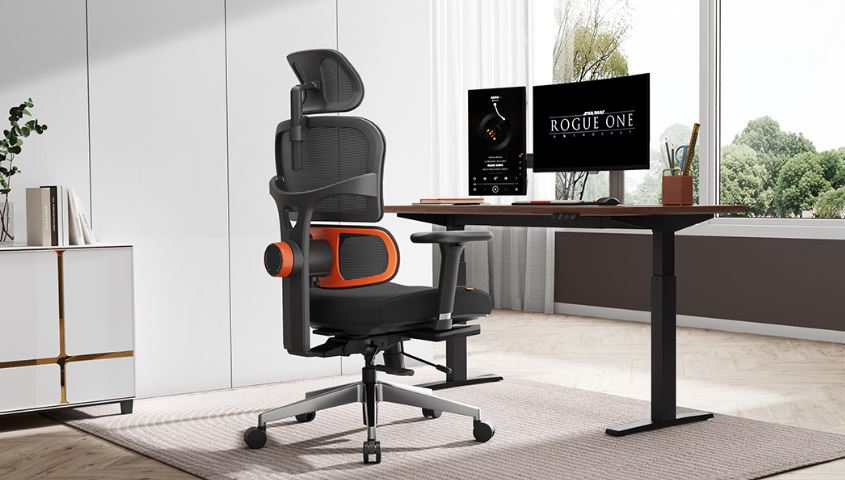
Choosing the right office seating can influence how comfortable employees feel throughout the workday and how effectively a workstation supports everyday tasks. If you are planning to Buy Ergonomic Chairs, it is important to look beyond appearance and consider adjustability, lumbar support, seat dimensions, armrests, materials, mobility, and compatibility with the desk. A properly selected chair should fit the person using it and work as part of a complete workstation rather than being treated as an isolated piece of furniture. OSHA guidance similarly emphasizes chair adjustability and proper support when setting up computer workstations.
For businesses in Manila, Quezon City, and other parts of Metro Manila, ergonomic seating can be particularly useful when employees spend extended periods working at computers. Whether you are furnishing a startup, corporate office, school, hospital, government department, or professional workspace, selecting chairs based on actual user needs can make your furniture investment more practical.
What Makes an Office Chair Ergonomic?
An ergonomic office chair is designed with adjustability and user support in mind. Instead of forcing every employee into the same fixed seating position, an adjustable chair can accommodate differences in body size, desk height, working habits, and preferred sitting positions.
Important features may include adjustable seat height, lumbar support, an adjustable backrest, seat-depth adjustment, armrest adjustment, a stable base, and smooth casters. OSHA recommends considering the backrest, seat, armrests, and base when evaluating an office chair.
The objective is not simply to purchase a chair with the word “ergonomic” in its product description. The real objective is to select seating that can be adjusted appropriately and positioned correctly with the desk, monitor, keyboard, and other workstation equipment.
Why Businesses Choose Ergonomic Office Chairs
Office furniture is a long-term investment, especially when dozens or hundreds of employees require seating. A chair that looks attractive but cannot be adjusted properly may not be suitable for employees who spend most of their day at a workstation.
Ergonomic seating gives businesses more flexibility because employees can make adjustments according to their individual requirements. OSHA notes that increased adjustability can provide a better fit and support different sitting positions, which becomes especially relevant when furniture is shared by multiple users.
For employers, the purchasing decision should therefore consider both immediate comfort and practical workplace requirements. A suitable chair should work with the existing office layout and provide enough adjustment options for the people who will use it.
Features to Check Before You Buy Ergonomic Chairs
When comparing ergonomic office chairs, start with the features that directly affect fit and adjustability.
Seat height: The chair should allow the user to position their feet comfortably while maintaining an appropriate relationship between the chair and desk.
Lumbar support: A supportive backrest should accommodate the lower back. Adjustable lumbar support can make it easier to position the chair according to the user.
Seat depth: The seat should provide adequate thigh support without pressing uncomfortably behind the knees. OSHA specifically recommends selecting a seat pan that accommodates the individual user.
Armrests: Adjustable armrests can help users position their arms without forcing the shoulders into an uncomfortable position.
Backrest adjustment: A backrest that can recline or adjust can provide flexibility for different working positions.
Base and casters: A stable five-leg base and suitable casters can make the chair easier to move and position around a workstation.
Material: Breathable mesh may be useful for users who prefer airflow, while upholstered options may provide a different feel and appearance.
Weight capacity: Always check the manufacturer’s specifications to ensure that the chair is suitable for the intended user.
How to Choose Ergonomic Chairs for Manila Offices
Manila offices can range from compact startup workspaces to large corporate headquarters. Because office environments differ considerably, there is no single chair configuration that works for every business.
Start by identifying how the Buy Ergonomic Chairs will be used. A workstation chair for an employee who works at a computer throughout the day may require more adjustment features than a visitor chair used for short meetings.
Next, consider the office desk dimensions. The chair should be able to move close enough to the workstation without the armrests or seat structure interfering with the desk.
Businesses should also consider flooring and office layout. Smooth casters may be useful in open-plan offices, while the appropriate caster type depends on the floor surface.
For larger purchases, it can be useful to test representative chair models before placing a full office order. OSHA’s purchasing guidance recommends trying a chair for comfort and fit before purchasing, because individual body types and requirements vary.
Choosing Ergonomic Chairs for Quezon City Workspaces
Quezon City businesses have diverse workplace requirements, from startups and professional firms to educational institutions, healthcare facilities, government offices, and larger corporate environments.
For a growing office, chair selection should consider future expansion as well as the current number of employees. A modular furniture plan can make it easier to add desks and seating later without creating an inconsistent workspace.
For procurement teams, it is useful to create a simple chair specification sheet before requesting quotations. Include required adjustment features, preferred materials, quantity, warranty requirements, delivery location, installation requirements, and expected usage.
This approach makes it easier to compare suppliers based on the same criteria rather than choosing a chair simply because it has an attractive appearance or low initial price.
Ergonomic Chairs vs Standard Office Chairs
Standard office chairs may provide basic seating, but ergonomic models generally place greater emphasis on adjustment and individual fit.
A basic chair may have a fixed backrest, fixed armrests, or limited seat adjustment. An ergonomic model may provide several adjustment points that allow the user to change the chair according to their workstation and body dimensions.
That does not mean every expensive chair is automatically better. The important consideration is whether the available features are useful for the intended users.
For a small office, a reasonably priced chair with essential adjustments may be more appropriate than a premium model containing features employees rarely use. For intensive workstation environments, additional adjustment options may be worth considering.
Common Mistakes When Buying Office Chairs
One common mistake is choosing chairs based entirely on appearance. A chair can look sophisticated while still failing to provide the adjustment range required by its users.
Another mistake is buying the same chair for every workstation without considering employee differences. OSHA’s workstation guidance points out that chair fit depends on factors such as seat height, seat depth, back support, and user dimensions.
Businesses should also avoid selecting chairs without checking their dimensions against existing desks. An armrest that is too high, for example, may prevent the chair from sliding properly underneath the desk.
Ignoring after-sales support can also create problems for larger office installations. Before purchasing, ask about warranty coverage, replacement parts, assembly, delivery, and service procedures.
How Much Should You Consider When Buying Ergonomic Chairs?
The right budget depends on the chair’s construction, adjustment features, materials, quantity, warranty, and intended use.
Current Philippine office-furniture listings demonstrate a broad range of chair prices. For example, Philippine retailers currently list office seating from basic models to higher-priced ergonomic chairs, showing why businesses should compare specifications rather than relying on price alone.
For a business purchasing multiple chairs, calculate the total project cost rather than looking only at the unit price. Include delivery, assembly, warranty considerations, and any required installation.
A procurement team can also divide requirements into essential and optional features. This creates a clearer specification and helps prevent unnecessary spending.
Ergonomic Seating for Different Types of Organizations
Different organizations may have different seating priorities.
Corporate offices: Employee workstations may require adjustable chairs designed for regular computer use.
Startups: Growing companies may prefer flexible seating that can adapt as teams and office layouts change.
Schools: Administrative and computer-based work areas may require practical, durable seating.
Hospitals: Administrative departments and staff offices may need chairs suited to different workstations and working schedules.
Government offices: Procurement specifications, durability, quantity, and maintenance can be important considerations.
Architects and interior designers: Chair dimensions, finishes, colors, and overall furniture coordination may be important when creating a complete workspace concept.
How to Test an Ergonomic Office Chair
If possible, test the chair before purchasing a large quantity.
Sit fully back against the backrest and check whether the lower back receives appropriate support. Adjust the seat height and see whether the chair works comfortably with the desk. Check whether the seat is deep enough to support the thighs without pressing against the back of the knees.
Test the armrests as well. They should not force the shoulders upward or prevent the chair from moving close enough to the desk.
Also check the movement of the chair. The base should feel stable, while the casters should work appropriately with the office flooring.
The goal is to evaluate the chair as part of the complete workstation rather than judging it while sitting away from the desk.
Why Workstation Compatibility Matters
Even a well-designed ergonomic chair cannot correct every workstation problem. Chair height, desk height, monitor position, keyboard placement, and other workstation components should work together.
OSHA explains that chair adjustment should be considered alongside the positioning of the monitor, keyboard, and desk.
This is especially important when businesses are furnishing an entire office. Rather than purchasing chairs separately from the rest of the furniture, consider the complete workstation configuration.
A coordinated approach can help procurement teams select compatible desks, chairs, monitor arrangements, and storage solutions from the beginning.
Buy Ergonomic Chairs for Your Office in the Philippines
When you are ready to Buy Ergonomic Chairs, start by defining your users, workstation requirements, budget, quantity, and essential features. Compare chairs based on adjustability, support, dimensions, construction, warranty, and compatibility with your existing office furniture.
For businesses in Manila and Quezon City, choosing a supplier that can discuss project requirements can also simplify larger office-furniture purchases. Instead of selecting chairs based only on photographs, request specifications and ask about delivery, installation, warranty, and available configurations.
Modern Desks and Office Cubicles can be considered when planning an office furniture setup where ergonomic seating needs to work alongside desks, workstations, and other office furniture.
Frequently Asked Questions
What should I look for when buying an ergonomic chair?
Look for adjustable seat height, suitable lumbar support, appropriate seat depth, comfortable armrests, a stable base, and compatibility with your desk.
Are ergonomic chairs suitable for long office hours?
Ergonomic chairs are designed with adjustability and support in mind, but the correct fit and overall workstation setup are equally important.
Where can I buy ergonomic chairs in Manila?
Businesses can compare local office furniture suppliers serving Manila and Metro Manila, then request product specifications, pricing, delivery details, and warranty information.
Can I buy ergonomic chairs for a large office project?
Yes. For larger purchases, request a quotation based on quantity and provide your preferred specifications, delivery location, and installation requirements.
What is the most important ergonomic chair feature?
There is no single feature that suits every user. Adjustability, proper back support, suitable seat dimensions, and compatibility with the workstation should all be considered.
Should ergonomic chairs have adjustable armrests?
Adjustable armrests can be useful because users have different body dimensions and workstation requirements. They should support the forearms without interfering with desk positioning.
Are mesh chairs good for offices?
Mesh can provide airflow and a different seating feel, but the quality of the frame, support system, adjustability, and overall fit should also be evaluated.
Should I test an ergonomic chair before buying it?
Testing is useful because chair fit varies between users. OSHA recommends trying chairs for comfort and fit before purchase when possible.
